Yet Another Discord Chat Link
# Yet Another Discord Chat Link









A simple mod to connect the in-game chat with a Discord channel.
## Why another one?
– This one focuses on simplicity. It is as light as it gets with only the basic functionality and very little required setup!
**Setup:**
1. Go to https://discord.com/developers and create a new application
2. Copy the ID and invite the bot with the following url (dont forget to change the ID or else the link won’t work:
“`url
https://discord.com/oauth2/authorize?permissions=2953964624&scope=bot%20applications.commands&client_id=APPLICATION_ID
“`
3. Enable developer mode on discord to be able to right-click a channel and copy its channel ID
4. Download the mod into the mods folder and let it generate the config file. The server will crash on first launch since the Bot Token is invalid.
5. Paste the copied channel ID of the channel that you would like the chat to be linked to into the config file (name: `config/yadclconfig.properties`)
6. On the discord developer dashboard, in your application, go to the bot tab on the sidebar and reset and copy the bot token and paste it into the config file.
7. Restart the server and you should be good to go. Check that the bot has read/write permission in that channel.
*Alternative suggested Setup Guide (not by me):*
https://erdbeerbaerlp.de/projects/discord-integration/quick-setup
Yet Another Calculator
# Yet Another Calculator
A Minecraft mod that adds in-game calculating functions.
## Installation
Put the mod in the mods folder, and make sure you have Fabric API and Fabric Language Kotlin installed.
## Usage
To calculate something, type `/calc `.
Supported operators: `( ) + – * / ^(power)`
Supported constants: `e pi` (case-insensitive)
Supported functions: `sin cos tan deg`
You can use `%n` and `Out[n]` to refer to the n-th calculation result. For example, `%1` and `Out[1]` is the first
result. Specially, `%` alone is the previous result.
Yet Another Bingo: Ultimate

*For an introduction to Minecraft BINGO, read “What is Minecraft BINGO?” on the wiki!*
This modpack is built around Yet Another BINGO, a multiplayer item hunt mod. It includes everything needed for the bingo mod as well as some quality-of-life additions: Zoomify, Dynamic Lights, Roughly Enough Items, Coords HUD, and more!

|
Up to 8 teams can compete to collect items on the BINGO card. Score items in horizontal, vertical, or diagonal
lines to win the game.
—
⌨ Press “Y” to see the Bingo Card in an inventory view!
|
## ⌨️ Keybinds
Here are a few useful keys that you might want to know:
– Y – View the BINGO card
– C – Zoom
– Tab – Show scoreboard
## Included Mods
This is not a complete list – see the versions tab for all of the mods and libraries used in the pack. I’ve limited this list to things that you’re likely to notice as a player:
– C2ME
– Coords HUD
– More Chat History
– Ok Zoomer
– Roughly Enough Items
– LambDynamicLights
– Scoreboard Overhaul
– Sodium + Sodium Extra + Iris
– Vanilla Tweaks
Visual Waxed Copper, Honey Stages, Unique Dyes, Unobtrusive Rain/Snow, Lower Shield
– Yet Another BINGO
## Credits
The very pretty Bingo Card HUD and “Bingo!” button textures were made by @marceles!
Parts of this mod are inspired from Extremelyd1/minecraft-bingo, the awesome Spigot/Paper version of this gamemode.
The logo design was inspired by Aikoyori/ProgrammingVTuberLogos
Vanilla Tweaks: https://vanillatweaks.net/
(in compliance with the terms and conditions at https://vanillatweaks.net/terms/)
Yeleefff’s Enderite
# Yeleefff’s Enderite
A simple mod that adds a successor to netherite, enderite, to the game. This mod focuses primarily on adding a new set of armor and tools while still keeping closely with the vanilla theme.
**Ore Generation and Crafting**
Enderite debris spawns in veins of 1-3 on the lower layers of end islands and can be smelted into enderite scrap. Four enderite scrap combined in a crafting table with four eyes of ender will give an enderite ingot. Enderite upgrade templates spawn in chests in end citites, and can be combined with an enderite ingot and a piece of netherite gear in a smithing table to upgrade it to enderite.
**Void Floating**
Enderite armor or tools that fall in the void will slowly float back up, giving the player a chance to retrieve their items before they despawn.
### Compatibility
– 1.21.6+ Enderite debris ore generation is now compatible with Enderscape
Yeet
# Yeet!
Yeet is a very simple mod about throwing things.
Yeet allows you to hold down the drop key (default Q) to wind up your arm.
Release it to throw your items farther.


Thrown items can be directly caught by other players.


Friend running low on materials? Just throw them some more!

fopwoc’s YAqol&oM
# fopwoc’s Minecraft modpacks
***”Gentoo” way to play minecraft*** – Why just share zip with your friends when you can write a CI for your modpack?
Inspired and partially based on Deckium and Fabulously Optimized modpacks.
### What does “YAqol&oM” means?
Y – Yet
A – Another
q – quality
o – of
l – life
& – and
o – optimization
M – Modpack
### So… what is it?
My personal vanilla-compatible modpack focuses on quality of Life, fixes, and optimization. It also includes numerous platform-related fixes (Mac and Linux issues) and features a well-designed Steam Deck layout.
### Performace?
Certainly! It incorporates nearly all modern and widely-used optimization mods. Here’s a brief list of them:
– Sodium – better rendering engine.
– Indium – Sodium addon with additional features and optimizations.
– Starlight – light engine rewrite.
– Lithium – game logic optimization.
– Exordium – HUD framerate render fix.
– ImmediatelyFast – faster entity, particles, etc. rendering.
– More Culling – better culling, huge performance boost.
– DashLoader – caches game data and makes it load super fast.
– ModernFix – an all-in-one fix and tweak mod for various aspects of the game.
– And more…
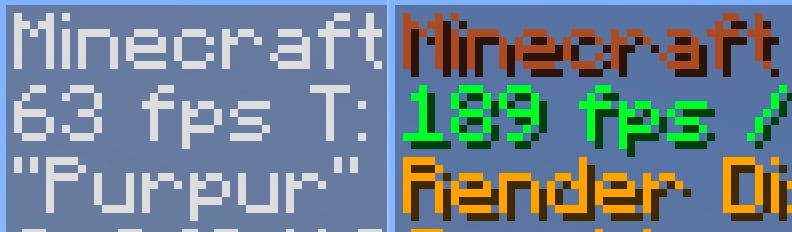
Compared to vanilla without mods, it offers a substantial performance boost and runs exceptionally well on my M1 Mac.
### Qol?
Absolutely! Everyone appreciates comfort, right? This modpack includes numerous useful mods that will make you never want to play without them again.
– CustomHud – I love seeing IRL time when playing the game. This is the best vanilla-looking HUD mod that lets me see it.
– Shulker Box Tooltip – You never remember what inside shulker boxes. So why not to preview them.
– Auto Elytra – Automatically switch chestplate to elytra and vice versa.
– Controlify – Controller support with many great features.
– Chat Patches – This mod makes chat great again.
– Durability Viewer – Useful for seeing the exact durability left with your items.
– Inventory Profiles Next – ADHD inventory sorting. But also has many awesome inventory management features.
– Chest Tracker – Helps you find in which chest your certain items are located.
– ChatWalk – Useful when you need to travel straight for a long distance but are too lazy to press the W button all the time (though not the main purpose of this mod).
– Xaero’s World Map – The best world map and waypoints mod ever existed.
– Ok Zoomer – My personal favorite zooming mod. This mod is literally the only reason why I use Quilt over Fabric 🙂
– Screenshot Viewer – Great way to preview screenshots right in-game. Handy on Steam Deck where I can’t open filesystem.
– And so much more…
### You mentioned it works well on the Steam Deck?
Sure thing! Here’s a short gameplay video on my deck:
https://github.com/fopwoc/minecraft-modpacks/assets/21304354/8e327b8c-762a-4343-b4f6-ae9a0ccd2e5d
Yapping Tooltips

Yapping Tooltips is a small client mod that adds tooltips to most items, developers can easily add compatibility to their items aswell.
_Feel free to include this project in modpacks!_
## 
– Developers can easily add their own tooltips by adding this to your language file:
`”yapping_tooltips.(translation_key).desc”: “This is a tooltip”`
– An example for adding a tooltip to a stone block that reads “Hello world” would be:
`”yapping_tooltips.block.minecraft.stone.desc”: “Hello world”`


**Q:** I have an issue/bug I want to report, where can I do that?
– **A:** You can leave bug reports on the GitHub page. Please be sure to see to both see if someone else has reported the same issue to avoid duplicates and to use proper tags when possible.
**Q:** I have a suggestion for the project, where can I leave it?
– **A:** You can leave suggestions for the project in our Discord server or the GitHub page, please make sure to follow the guidelines for posts/issues and use proper tags when possible.
**Q:** Will there be a port to **X** version?
– **A:** I do not have any plans to port to any older versions of Minecraft, as for newer versions of the game I will probably be sticking to the biggest modding version at a given time since that will be the version I will be playing the game on.
Yappadium
Yappadium is a Performance modpack based around a steady FPS and TPS count
The Combined mods have been carefully selected to be safe in your worlds and provide noticeable speed benefits on any device.
Yappadium includes features that allow you to experience Minecraft just as you remember it, no extra mods are included in the modpack
**IMPORTANT MESSAGES FOR THE (NEO) FORGE VERSION**
– **DO NO**T update Nvidum (NeoForge), This wil crash you’re game.
– **DO NOT** download Sodium Extra’s, this will crash you’re game.
– If you want to play with the Create mod, please download the Create version for Yappadium or **delete Radium** from the modlist.
My PC specifications are:
CPU: AMD Ryzen 5 9600X 6-Core z
GPU: NVIDIA GeForce RTX 5060 Ti 16GB Version
**I will regularly update this modpack to newer versions if most of the mods are up to date!**
YAMP
# Introduction
YAMP is a kitchen sink modpack for Quilt 1.18.2 with about 100 mods
# WARNING
This modpack is in ALPHA. While it does not appear to have problems with the most basic of testing, there is no guarantee of stability, version compatibility, and/or balance. Here be dragons (just not in the world generator)!
# Features
– Most mods are hosted on Modrinth, with Tech Reborn/Reborn Core and LambdaMap being the only exceptions
– A selection of most major Fabric mods (alongside some less common ones)
# Plans
– A unique and coherent design for the pack
– Custom content to integrate mods and extend the endgame without enforcing progression
– Balance tweaks to ensure a fun yet challenging experience
– A guide for both custom content and under-documented mods
– Somewhat wrangle the oregen, it’s a bit nuts right now
# Project
This project is managed on SourceHut. You can see the project page here.
Yet Another Modpack
# Yet Another Modpack
Thinkseal’s modpack full lots of random mods!
 
This modpack contains many progression and QOL mods.
It is meant to be a magical steampunk styled modpack.
I hope you like it.
—
Details
full list of mods (202)
3d-Skin-Layers
Additional Lanterns
Additional Structures
Adorn
All The Fan Made Discs
Amarite
AmbientSounds
Amendments
Amethyst Core
Amethyst Imbuement
Animatica
Antique Atlas
AppleSkin
Architectury
Axolotl Buckets
BadOptimizations
Better Combat
Better Statistics Screen
Better Third Person
BetterF3
Biolith
Blur (Fabric)
Bobby
Bookshelf
Botania
Bridging Mod
CICADA
CIT Resewn
Chat Heads
Cherished Worlds
ChoiceTheorem’s Overhauled Village
Clear Despawn
Cloth Config v11
Clumps
Collective
Comforts
Compressed Blocks
Concurrent Chunk Management Engine
Continuity
Controlling For Fabric
CorgiLib
Cosmetica
Crawl
Create
Create Big Cannons
Create: Bells & Whistles
Create: Steam ‘n’ Rails
CreativeCore
Cristel Lib
Crops Love Rain
DCCH
Dark Loading Screen
DarkPaintings
Dawn API
Debugify
Decorative Blocks
Deeper and Darker
Detail Armor Bar
Display Case Mod
Do a Barrel Roll
Double Doors
Dungeons and Taverns
Effective
Elytra Slot
Emoji Type
Enchancement
EnchantmentDescriptions
Ender Dragon Fight Remastered
Enhanced Block Entities
Entity Model Features
Entity Texture Features
EntityCulling
Expanded Delight
Extended Drawers
Fabric API
Fabric Language Kotlin
FabricSkyBoxes
Falling Leaves
Farmer’s Delight
Farmer’s Knives
Fast IP Ping
Fast Load
FastQuit
FerriteCore
Festive Delight
Forge Config API Port
Friends & Foes
FrozenLib
Fusion
Fzzy Config
Fzzy Core
GeckoLib 4
Handcrafted
Healing Campfire
Held Item Info
ImmediatelyFast
Immersive Structures
Indium
InvMove
Inventory Profiles Next
Inventory Tabs
Iris
Jade
JamLib
Just Enough Items
Krypton
LambDynamicLights
LazyDFU
Let Sleeping Dogs Lie
Lithium
Lithostitched
Lovely Snails
M.R.U
Make Bubbles Pop
Memory Leak Fix
MidnightLib
Mod Menu
ModMenu Badges Lib
Model Gap Fix
ModernFix
Moonlight
Mooshroom Tweaks
More Axolotl Variants API
More Axolotl Variants Mod
More Chat History
More Culling
More Geodes
More Mobs
Mouse Tweaks
No Chat Reports
Noisium
NotEnoughAnimations
Nullscape
Oh The Biomes We’ve Gone
Oh The Trees You’ll Grow
Origins
Patchouli
Pehkui
Pick Your Poison
Player Animator
Polymorph
Promenade
Puzzles Lib
Rechiseled
Rechiseled: Create
Reese’s Sodium Options
Remove Reloading Screen
Repurposed Structures
Resourceful Lib
Right Click Harvest
Satin
Searchables
Shulker Box Tooltip
Simple Voice Chat
Smooth Swapping
Sodium
Sodium Extra
Sodium Shadowy Path Blocks
Sounds
Spawn Animations
Starlight
Status Effect Bars
SuperMartijn642’s Config Lib
SuperMartijn642’s Core Lib
Supplementaries
Surveyor Map Framework
TCD Commons API
Tectonic
TerraBlender
TerraBlenderFix
Terralith
ThreadTweak
ToolTip Fix
Towns and Towers
Trinkets
Universal Ores
Very Many Players
Visual Workbench
VisualOverhaul
Visuality
Wilder Wild
Winterly
YUNG’s API
YUNG’s Better Desert Temples
YUNG’s Better Dungeons
YUNG’s Better Jungle Temples
YUNG’s Better Mineshafts
YUNG’s Better Nether Fortresses
YUNG’s Better Ocean Monuments
YUNG’s Better Strongholds
YUNG’s Better Witch Huts
YUNG’s Bridges
YetAnotherConfigLib
Zoomify
[[Let’s Do] API](https://modrinth.com/mod/4XJZeZbM)
[[Let’s Do] Vinery](https://modrinth.com/mod/1DWmBJVA)
e4mc
iChunUtil
libIPN
oωo
spark
technomodel
Resource Packs (3) / Shaders (1)
Fresh Animations
Pride GUI Legacy
Pridepack
Complementary Shaders – Reimagined
For the recommended experience please use 6GB of RAM or more.
**If you are running this on a dedicated serer you need to remove Effective in the 1.19.2 version or the server will crash.**
If you find any bugs or have mod suggestions please tell me on discord.
## 🏳️🌈-Pridecraft
Have you ever thought that your game is too boring and straight? Well, that’s no more! Get Pridepack *(or its variations)* today!